📍 Pinned Categories and 2nd Round of Budget Book Settings Update!

Money Keeper · Track Money Easily
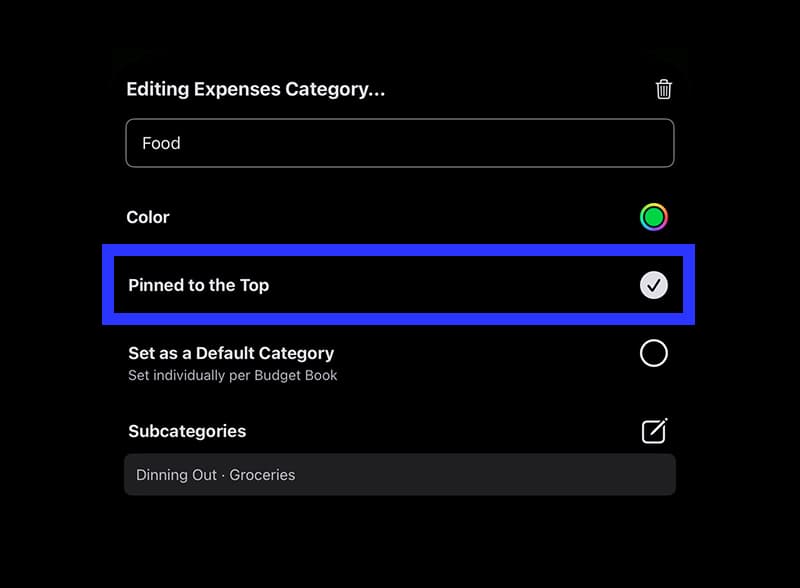
Hello! ☺️ The highly requested “Pinned Categories” feature is now available! You can now pin your most frequently used categories to the top, making them easier to find 🙌
If you’ve been managing your expenses for a long time with the Money Keeper app, you likely have a long list of spending categories — so this feature should be especially helpful! I personally use the “Food” category the most, and plan to pin it right away 😄
I also considered allowing users to reorder the categories manually, but felt that pinning would be a more convenient option. I’ll continue improving usability so you can enjoy an even smoother experience — thank you for your support 🌈
You can pin a category from the editing screen, which you can access by tapping the pencil icon next to each category on the selection screen. You can also set it when creating a new category 📍
A heartfelt thank you to everyone who took the time to share your valuable feedback! 🙇♂️
Also, in the previous update, I introduced the ability to set the “Start Day of Calendar” and “Currency” for each Budget Book. Now, I’ve extended that to the spending widget as well! You can now view widgets tailored to each Budget Book 👍
After adding the “Expenses for This Month(Cycle)” widget, press and hold the widget to open the edit screen. From there, you can select which Budget Book to display, and the calendar start date and currency settings for that book will be applied to the spending shown 💪
—
Thank you to everyone who continues to manage their spending with Money Keeper 🙏
Wishing you good health always 💪
Hope you have a happy day~! 🌈✨

Money Keeper
Expenses Tracker, Payday & Budget Calendar