First Update for Easier Deletion and Widget Usability Improvements 🙌

Scheduler · iPhone Calendar App
Hello! 😎 I’m here with news about a new Scheduler update that makes the app even more convenient to use~!
📌 Easier Deletion of Reminders
Several users suggested that it would be helpful to delete events and tasks (linked Reminders) directly from the event list without opening the edit screen. This was an essential usability feature to make managing schedules more convenient, but surprisingly, it required quite a bit of research to determine the right implementation approach. I recently finalized the implementation approach and released the first update.
This first update makes it easier to delete Reminders.
📱 On iPhone and iPad, you can delete a Reminder by “pressing and holding” it, then tapping the “Delete” button that appears.
💻 On Mac, you can delete a Reminder by “right-clicking” it, then clicking the “Delete” button that appears.
In the second and third updates, I plan to make it possible to delete not only Reminders but also “Scheduler’s own events” and “linked external calendar events” in the same way.
🍯 [If You’re New to Scheduler] How to Link Reminders
Once you link Apple Reminders, you can use them just like “Scheduler’s built-in task feature.” Even if you haven’t used Reminders before, you may find this feature useful!
- Tap the “three dots” button at the top right of the app screen, then go to “Preferences” from the screen that appears.
- Enable “Link Apple Reminders” and select the Reminder lists you want to sync.
- You can now tap the new “square +” icon on the home screen to add Reminders, and you can also edit and delete them using Scheduler’s built-in Reminder editor 👍
📌 Internal Architecture Improvements
Scheduler has been growing together with its users for nearly three years since its launch. Along with incorporating your feedback, I continuously improve the app’s internal architecture and code so that you can always use it at lightning-fast speed⚡️ with no loading delays.
📌 Improved Navigation Between Widgets and the App
I’ve improved navigation between all widgets and the app so that when you tap a widget to open the app, you can quickly continue to the event you were viewing in the widget. For example, the calendar widgets for this month, next month, and last month will now take you directly to the corresponding month.
Money Keeper’s “Daily” Recurrence Is Now Available 🌠
The ‘Daily Recurrence’ feature, which many of you have requested, is now available 🎉
You can now easily register things like daily savings deposits and daily transportation expenses. When adding income or an expense, select ‘Daily’ under ‘Recurrence’ to register income or expenses that occur every day. I sincerely thank everyone who shared their valuable feedback 🙏
To stay true to the app’s philosophy of providing “only the features you need,” I’m trying to add only the recurrence options that are truly necessary, and I’m also considering adding other useful recurrence options in the future. If you have any suggestions, I’d really appreciate it if you could share them anytime through [More > Send Feedback] in the app 📧

Money Keeper
Expenses Tracker, Payday & Budget Calendar
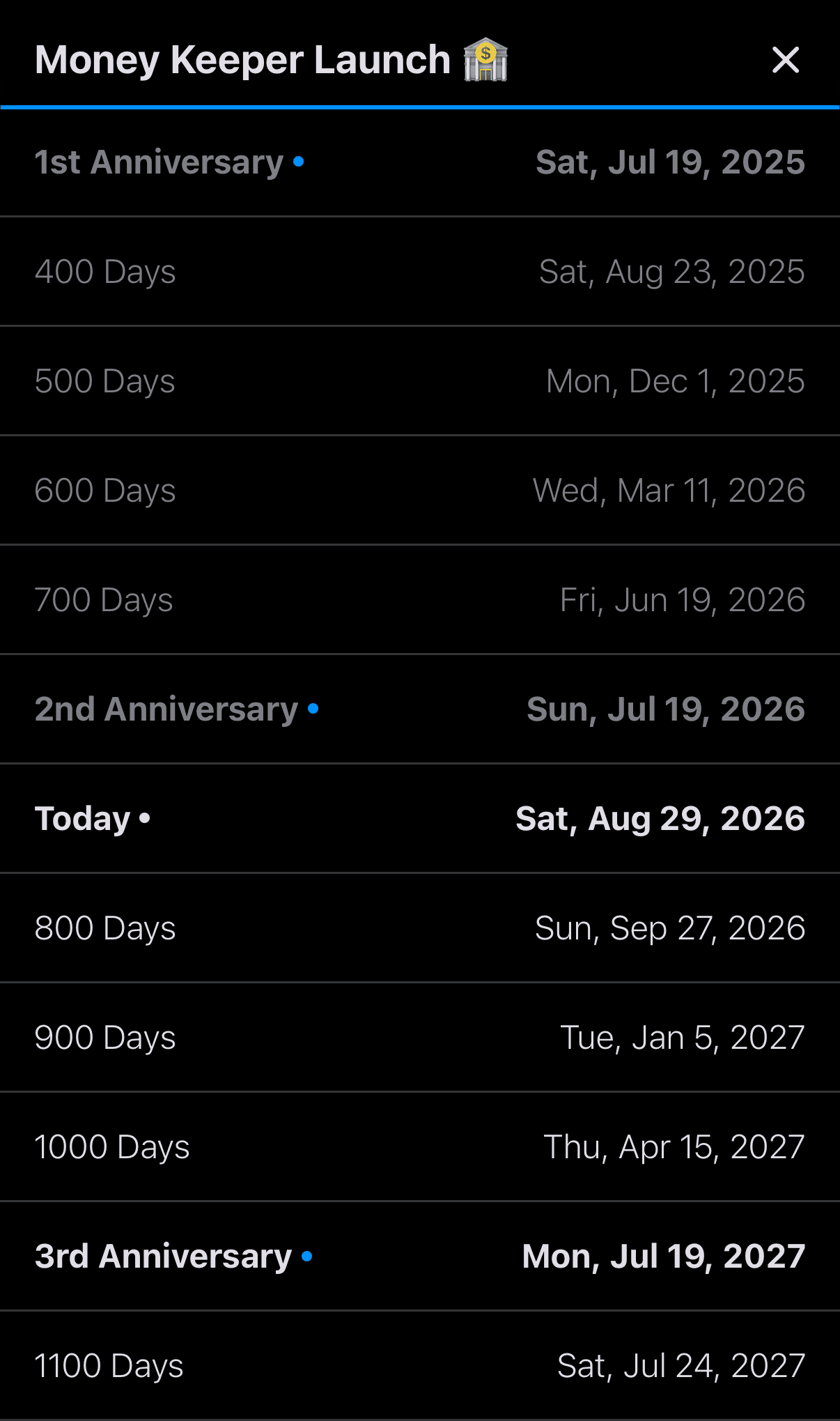
Dayte Countdown App Adds a “Special Dates List” for 100 Days, 200 Days, 1st Anniversaries, 2nd Anniversaries, and More 🎂 🎉
The “Special Dates List” feature, requested by many Dayte users, is now available. Dayte categorizes “special days” into the following three types. For special days registered as “Since,” which you might use to calculate things like how many days you’ve been together as a couple or your baby’s age in months, the new “Special Dates List” now lets you check milestones such as 100 days, 200 days, the 1st anniversary, the 2nd anniversary, and more 🎂
📍 Countdown
📍 Recurring Countdown
📍 Since

Dayte
Countdown · Only What You Need
—
Thank you to everyone who uses Scheduler to manage your schedules 🙏
Whenever you need my help or have feedback, please feel free to send me a message through [More > Send Feedback] in the app. I’ll be happy to reply and help however I can 📨
I hope you’re always taking good care of your health 💪
Have a wonderful day! 🌈✨
Scheduler
iPhone Calendar App