Deletion Convenience Improvements: Second and Third Updates 👍

Scheduler · iPhone Calendar App
Hello! 😊 Following the recent first update to improve deletion convenience, the second and third updates are now complete! You can now delete not only events created in the Scheduler app, but also events from linked calendars and tasks (linked reminders) directly from the event list without opening the edit screen.
📱 On iPhone and iPad, you can delete events and reminders by “pressing and holding” them, then tapping the “Delete” button that appears.
💻 On Mac, you can delete them by “right-clicking” and selecting the “Delete” button that appears.
I hope this update makes managing your schedule even more convenient than before. Thank you to everyone who took the time to share your valuable feedback 🙏
I’m also continuously improving the app’s “internal architecture” so you can use it at lightning-fast⚡️ speed without bugs or errors. If you encounter an error or bug while using the app, please feel free to report it through “Send Feedback” on the screen that appears when you tap the “three dots” button in the top-right corner of the app. I’ll work quickly to resolve it so you can continue using the app without inconvenience 👍
Money Keeper’s Second Update for Recurring Fixed Expenses, Including “Weekdays” 🌠
Following the “Daily” recurring option update, which I shared along with a preview of the upcoming “Custom Period Analysis (Annual Analysis)” feature, the second update with additional recurring options is now complete 🎉
The 5 recently added recurring options are marked with 🆕 below, and you can now manage fixed expenses and fixed income using a total of 11 recurring options, including the existing ones.
📍 Daily 🆕
📍 Weekdays 🆕
📍 Weekends 🆕
📍 Weekly
📍 Biweekly
📍 Monthly
📍 End of the month
📍 Every 2 months
📍 Every 3 months (Quarterly) 🆕
📍 Every 6 months (Semiannually) 🆕
📍 Yearly
For fixed expenses like “Transportation 🚆,” I recommend setting them to “Weekdays” rather than “Daily,” as this may be more useful for managing regular commuting expenses 👍
To stay true to the app’s philosophy of providing “only the features you need,” I’ve tried to add only the recurring options that are truly necessary. With this update, all the useful recurring options users have suggested are now available. I sincerely appreciate everyone who shared their valuable feedback 🙏

Money Keeper
Expenses Tracker, Payday & Budget Calendar
Dayte Countdown App Update: “Special Dates List” for 100 Days, 200 Days, 1st Anniversaries, 2nd Anniversaries, and More 🎂 🎉
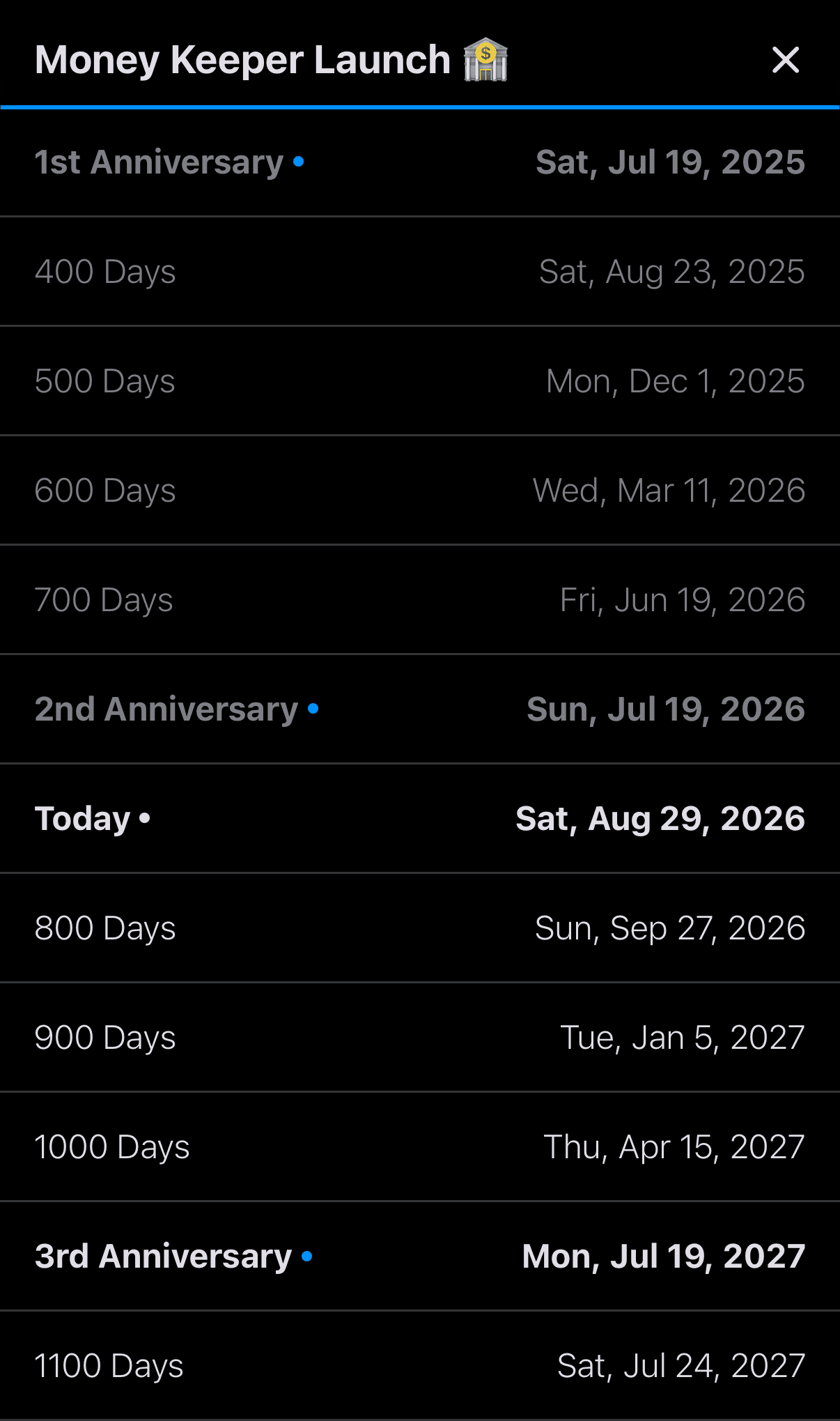
The “Special Dates List” feature, which many Dayte users requested, is now available. Dayte categorizes “special days” into the following three types, and for special days registered as “Since,” which you may use to track things like days together as a couple or a baby’s age in months, the newly added “Special Dates List” now lets you see special milestones such as 100 days, 200 days, 1st anniversaries, 2nd anniversaries, and more 🎂
📍 Countdown
📍 Recurring Countdown
📍 Since

Dayte
Countdown · Only What You Need
—
Thank you to everyone who uses the Scheduler app to manage your schedule 🙏
Whenever you need my help or have feedback, please feel free to send it through [More > Send Feedback] in the app. I’ll be happy to reply and help you 📨
I hope you always take good care of your health 💪
Have a wonderful day! 🌈✨
Scheduler
iPhone Calendar App